 Petty Cash Manager
Petty cash, receipts and approvals, done in minutes.
Give each person a cash float. They snap the receipt, you approve it, and the app keeps the balance, splits the VAT and gets your books ready.
No card needed · From $3.50 a month · 14-day money-back guarantee
- Snap a receipt, the amount fills itself in. Saudi e-invoice QR codes are read instantly.
- Staff submit from a link, no login needed. You approve or reject.
- Works offline. Your records stay on your own device.
See it in action (2 minutes)
Built for the way petty cash really works
An accountant's tool, not a generic expense tracker. It follows the imprest system most companies already use.
Shops and tradingRestaurantsContractors and site officesClinicsSchoolsSmall offices
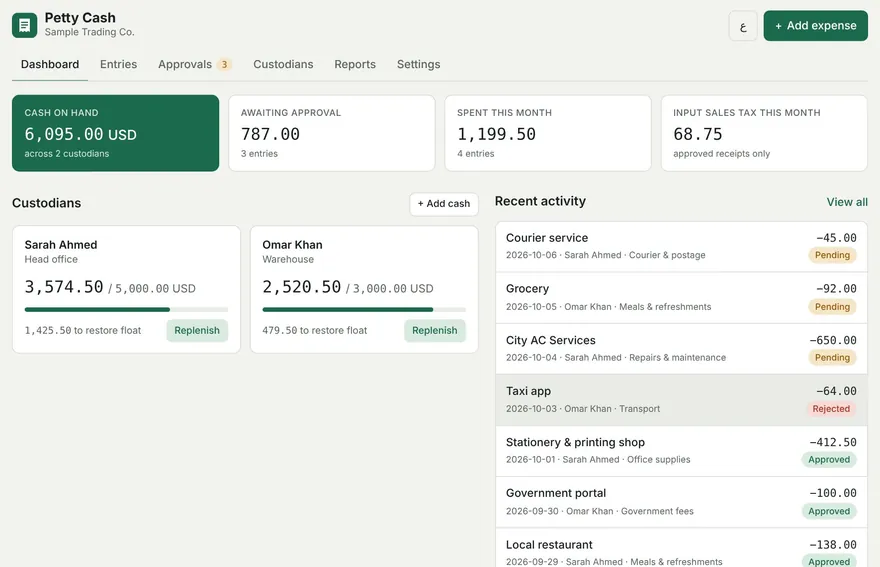
Custodians, floats and staff advances
Each person or site gets a fixed float with a live balance and a low-cash warning. Hand cash advances to staff and see who still holds how much; their receipts are deducted automatically.
Receipt scan
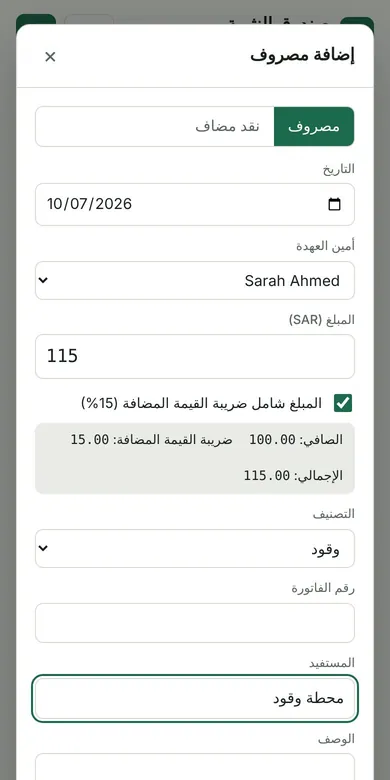
Snap the receipt and the amount fills itself in. Saudi e-invoices are read from their QR code (seller, VAT number, total and VAT), even offline. Other printed receipts can be read from the photo text.
Automatic tax split
VAT, GST or sales tax at your rate. Each receipt is split into net and tax, ready for your tax return.
Staff submit, you approve
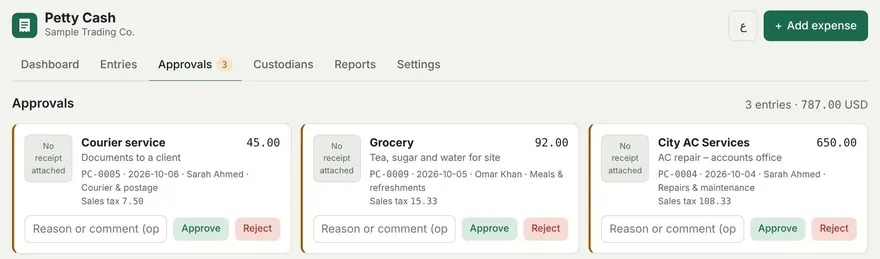
Send each team a link. Staff add their own expenses with a receipt photo from their phone, with no account needed, and send them to you on WhatsApp. You approve or reject each one with a note.
Works with your accounting software
Spending reports, an input-tax register, and import-ready files for Zoho Books, QuickBooks and Xero.
Your country, your language
Pick your country and the currency and tax rate fill in. English, Hindi and right-to-left Arabic.
Three steps, every month
Set the float
Add each custodian and the cash amount they hold, for example 5,000.
Record each receipt
The custodian enters the amount, picks a category and attaches the photo. Tax is split for them.
Approve and replenish
The approver reviews the receipts. One click tops the float back to its full amount.
InstallPut it on your phone or computerNo app store needed. Install once from your browser; it opens like any app, works offline and updates itself. Tap to see how.
Android phone
- Open the app in Chrome.
- Tap Install app at the top of the app, or tap the ⋮ menu and choose Install app (or Add to Home screen).
- Tap Install. The icon appears on your home screen.
iPhone or iPad
- Open the app in Safari.
- Tap the Share button at the bottom of the screen.
- Scroll down and tap Add to Home Screen, then Add.
Windows or Mac computer
- Open the app in Chrome or Edge.
- Click Install app at the top of the app, or the install icon at the right end of the address bar.
- Click Install. It opens in its own window and appears in your Start menu or Dock.
Your entries are saved on each device separately. To move them to a new phone or computer, use Settings → Download backup on the old one and Restore from backup on the new one.
One app, four ways to pay
Every plan includes every feature. Add Cloud sync to any plan for +$3 a month if your team works on several devices. The longer the plan, the more you save. Prices in US dollars; VAT or GST is added at checkout where your country requires it.
🎉 Launch offer: 50% off your first payment, applied automatically at checkout. For the first 20 customers, until 18 November 2026.
Frequently asked
Where is my data stored?
On your own device, inside your browser. Your entries and receipt photos are not uploaded to our servers unless you switch on Cloud sync (with a “+ Cloud” plan), which keeps a copy on our EU cloud server so your team can use the same data on several devices. Without Cloud sync, use Settings → Download backup regularly, and Restore to move to a new device.
What is Cloud sync?
An optional add-on (+$3 a month on any plan, included in the free trial). Sign in with your email, upload your company, and invite your team as manager, cashier or viewer. Everyone sees the same entries and receipt photos on their own phone or computer. The app still works offline; changes sync when you are back online. Auto sync can be turned off if you prefer to sync by hand.
Does it work without internet?
Yes. Once opened or installed, the app works offline. It goes online only to check for updates and to confirm your license about once a week.
How does the free trial work?
Open the app and use every feature for 14 days. It starts with sample data so you can see how it works; clear it with one click when you are ready. After the trial, your entries stay safe and viewable, and a license key unlocks adding new ones.
How do I get my license key?
After you pay, your key is emailed to you straight away. Enter it under Settings → License in the app.
Can I use it on more than one device?
Yes. Monthly works on 2 devices, 3 months on 3, 6 months on 5 and yearly on 6, for example computers and phones for your team. Data is stored per device, so use backup and restore to copy it between them.
Which countries and taxes are supported?
Any country. Pick from 24 presets (such as Saudi Arabia, UAE, Pakistan, India, UK and the US) or set your own currency, tax name and rate. Always check that the rate matches your current local rate.
Does it work with Zoho Books, QuickBooks or Xero?
Yes. In Reports, download a file made for Zoho Books (as expenses) or for QuickBooks and Xero (as a petty cash account statement), then import it in your accounting software. You can match each category to your own account names or codes in Settings.
Can I cancel or get a refund?
Yes. Cancel at any time from the link in your receipt email; your plan stays active until the end of the period you paid for. If it does not work for you, email us within 14 days of any payment for a full refund. See our refund policy.
What if I lose my phone?
Download a backup now and then from Settings → Backup (it can be password-protected) and keep it on email, WhatsApp or Google Drive. Restore it on the new phone and everything is back. The app also keeps automatic copies on the device and reminds you when a backup is due.
Try it with your own receipts today
14 days free. No card needed. Your sample data shows you how it works in two minutes.
Open Petty Cash Manager