 Petty Cash Manager
Free petty cash voucher template
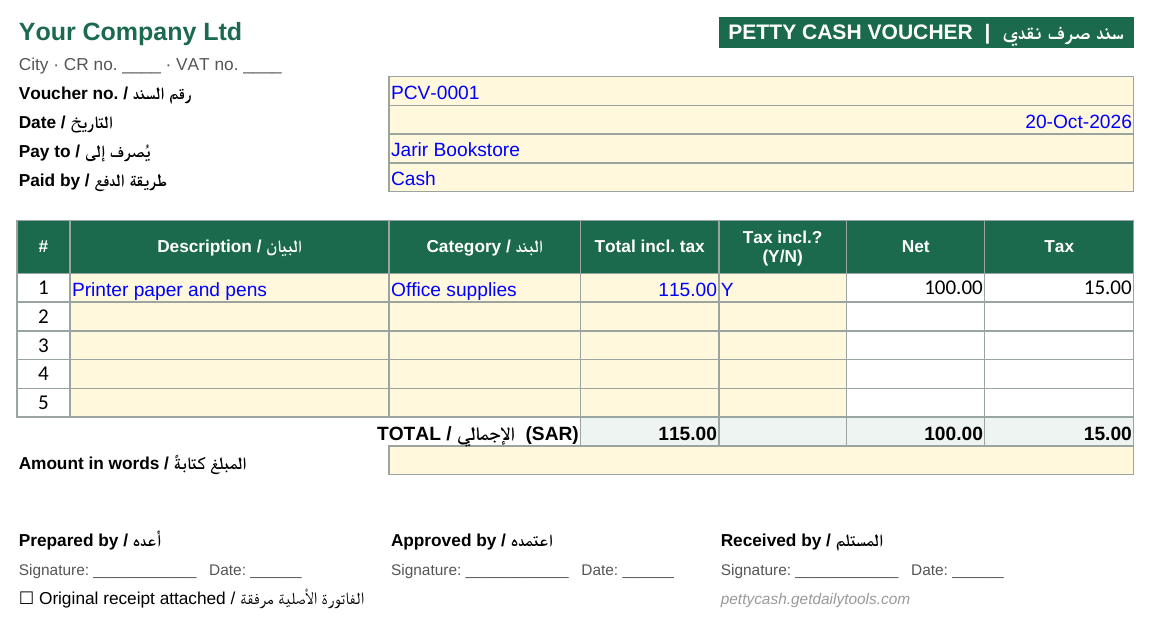
A printable petty cash voucher for Excel and Google Sheets. Fill it in for every payment, and it splits out VAT, adds up the total and leaves space for signatures. Two vouchers print on one A4 page.
Free. No sign-up, no email. Labels in English and Arabic (سند صرف نقدي).
Everything an auditor looks for
Header
Your company name, address and VAT number, filled in once on the Settings sheet and shown on every voucher.
Voucher number and date
Number vouchers in order (PCV-0001, PCV-0002…) so a missing one stands out.
Up to five lines
Description, category and receipt total for each item. Mark Y if tax is included and the net and VAT are split for you.
Totals and amount in words
Total, net and tax add up automatically. Write the amount in words to prevent changes.
Three signatures
Prepared by, approved by and received by, each with a date.
Receipt check box
Tick when the original receipt is stapled to the voucher.
From payment to file in four steps
Fill in Settings once
Company name, address or VAT number, currency and tax rate.
One voucher per payment
Enter the next number, the date, who was paid and each item with its receipt total.
Print and sign
Two vouchers per A4 page. The approver and the person receiving the cash sign.
Attach and record
Staple the receipt, file vouchers by number and record each one in your petty cash log.
Petty cash vouchers, explained
Why use a voucher at all?
Small payments are where cash goes missing. A voucher turns every payment into a signed record: who asked for the money, who approved it, who received it and what it was for. When you reconcile petty cash, the vouchers plus the cash left in the box should always add up to the float.
Voucher or receipt?
The receipt comes from the shop. The voucher is your internal form. Keep both: the receipt proves the purchase (and is needed to claim VAT), the voucher proves it was approved and who got the cash. If there is no receipt, for example a tip or a small transport fare, the voucher with signatures is your only record, so fill it in fully.
Tips that save trouble at audit time
- Never leave a voucher number unused. If one is spoiled, write VOID on it and keep it.
- Write the amount in words as well as figures.
- Only claim VAT on a valid tax invoice, and check the rate matches your current local rate.
- Set a limit for a single petty cash payment. Anything above it should go through normal purchasing.
Tired of paper vouchers?
Petty Cash Manager records each payment on the phone with a photo of the receipt, sends it for approval and keeps the running balance for every custodian. English and Arabic. 14 days free.
Try Petty Cash Manager freePetty cash voucher FAQ
What is a petty cash voucher?
A small form filled in for every payment made from petty cash. It records the date, who was paid, what for and how much, and is signed by the approver and the person who received the money. The original receipt is attached to it.
What should a petty cash voucher include?
A voucher number, date, payee, a description of each item, the expense category, the amount (with tax shown separately if you claim it), the total in figures and words, and the signatures of the preparer, approver and receiver.
Who signs a petty cash voucher?
Usually the custodian who prepares it, a manager who approves it, and the person who receives the cash.
Can I use it in Google Sheets?
Yes. Upload the file to Google Drive and open it with Google Sheets. The formulas keep working; check the print settings before printing.
Is it really free?
Yes. Download it and use it as often as you like.